




Choosing between Nextiva and Grasshopper comes down to more than price. It’s about how your business currently communicates and how it plans to grow. While both platforms offer virtual phone system features, they’re built for different types of teams and different stages of growth.
In this comparison guide, we break down Nextiva vs. Grasshopper across pricing, features, reliability, scalability, and overall value so you can decide which solution best fits your business goals.
Nextiva vs Grasshopper: Quick Verdict
Here’s a quick comparison before we dive into the details:
- Nextiva is built for growing teams that need advanced features, reporting, and room to scale.
- Grasshopper is better suited for solopreneurs and very small businesses that want a simple virtual phone system.
| Feature | Nextiva | Grasshopper |
|---|---|---|
| Overall rating (G2) | 4.5/5 | 3.9/5 |
| Pricing | Core ($15/user/mo) Engage ($25/user/mo) Power Suite CX ($75/user/mo) |
True Solo ($14/mo) Solo Plus ($25/mo) Small Business ($55/mo) |
| Free trial | Free demo available | 7 days |
| Key features | Full call management (queues, routing, skill-based), analytics and reporting, team messaging, video conferencing, CRM integrations, automated workflows. | Virtual phone system basics (call forwarding, voicemail, business texting), simple call handling, limited analytics. |
| Ease of use | 8.7/10 | 8.2/10 |
| Ease of setup | 8.4/10 | 8.0/10 |
| Ease of admin | 8.6/10 | 8.3/10 |
| Support | 24/7 support, onboarding resources, advanced support tiers, detailed documentation, and dedicated customer success options. | Standard support during business hours with basic documentation and help center articles. |
| Reliability | Enterprise-grade uptime with redundant architecture and SLAs; robust network with failover options. | Solid basic voice reliability; lacks advanced redundancy and enterprise SLAs. |
| Call center infrastructure | 8.6/10 | Not enough data to provide rating |
| Scalability | Highly scalable—easily adds users, integrations, features like analytics, call routing, and unified communications as needs grow. | Designed for small growth; limited scalability for large teams or complex routing workflows. |
| VoIP phone service | 8.5/10 | 7.5/10 |
| Best for | Growing small- to mid-sized businesses, teams with diverse communication channels, contact centers, and organizations needing scalable features. | Solopreneurs and very small teams that need a simple business phone number and basic call handling. |
Now let’s dive into the specifics.
Pricing: Plans, Add-Ons, and How Billing Works
When comparing Nextiva vs. Grasshopper, it’s not just about price — it’s about value.
Nextiva pricing
Pricing plans
Nextiva has three primary pricing tiers for its small business phone system:
- Core ($15/user/mo)
- Engage ($25/user/mo)
- Power Suite CX ($75/user/mo)
How billing works (important for total cost):
- Nextiva pricing is per user (seat/line), so cost scales with the number of users you add.
- You’ll also see standard taxes/fees applied per line.
Add-ons (what can increase total cost):
- If you choose a month‑to‑month (vs. annual) contract.
- Total cost can also increase based on optional capabilities (higher-tier routing/analytics, additional channels, or advanced CX features depending on your plan mix).
Grasshopper pricing
Pricing plans
Grasshopper has three pricing tiers for its small business phone system:
- True Solo ($14/mo)
- Solo Plus ($25/mo)
- Small Business ($55/mo)
How billing works (important for total cost):
- Grasshopper uses flat monthly plan pricing (not per user), with limits based on phone numbers and extensions.
- Taxes and regulatory fees also increase the monthly cost.
Add-ons (what can increase total cost):
- Extra numbers are $9/month each
- Extra extensions (available on Solo Plus plan or higher) cost $3/month each
- International calling requires a $500 deposit before use
Pricing varies by billing term and promotions, so always check each vendor’s pricing page for current rates.
For small businesses, Nextiva’s comprehensive packages provide an excellent return on investment (ROI) by consolidating communication tools into one platform.
Unlike Nextiva, Grasshopper lacks tools like video conferencing, CRM integrations, and advanced call routing. While ideal for startups and small teams who just need the basics, businesses looking to scale and streamline communications may find that Grasshopper’s affordability comes at the cost of long-term value.
Features compared
When choosing a business phone system, the features offered can significantly impact efficiency, customer experience, and team collaboration.
Nextiva and Grasshopper cater to different business needs, with Nextiva providing a comprehensive communication suite and Grasshopper focusing on simplicity and affordability.
Auto-attendant and call routing (IVR)
While both Nextiva and Grasshopper offer unlimited calling, Nextiva excels in call management by offering advanced features that enhance communication efficiency.
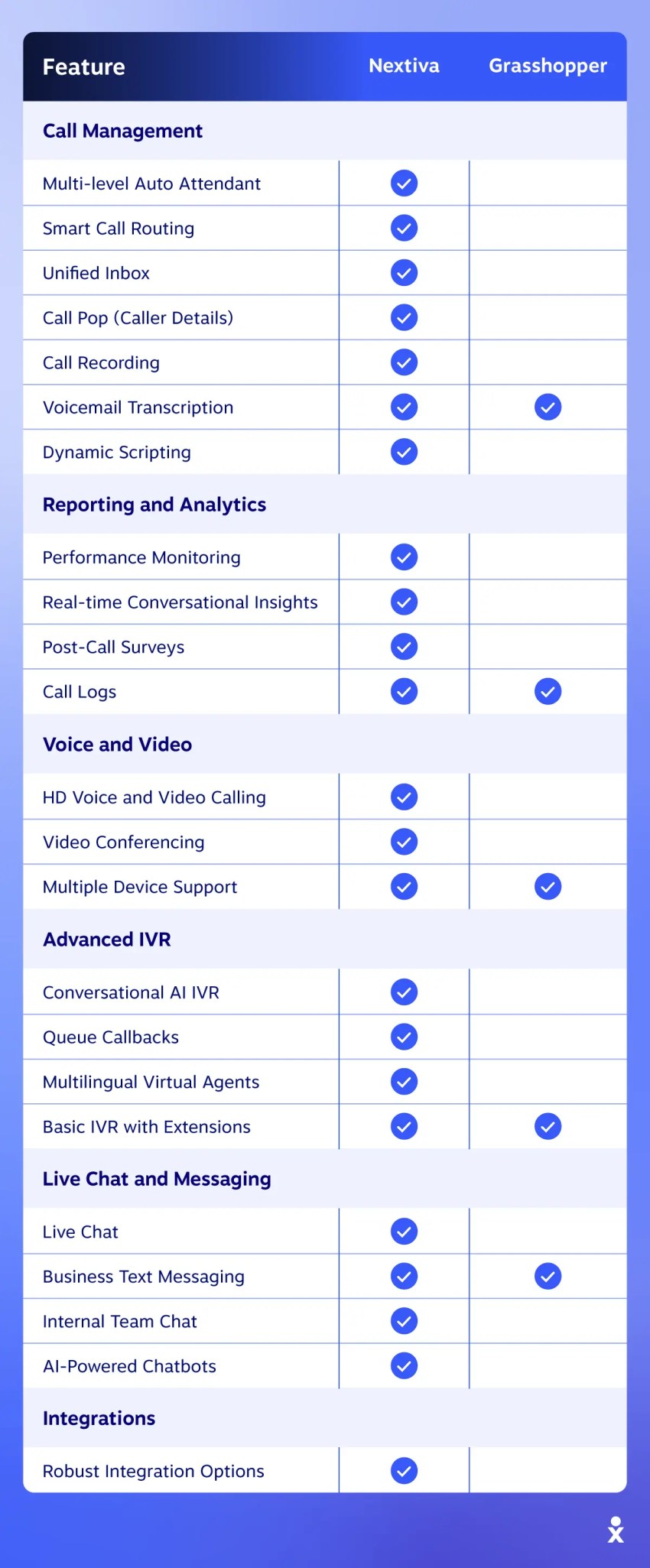
- Nextiva: Provides a multi-level auto attendant (with day/night modes and different messages) with smart call routing, and distinguishes IVR as a more advanced option than a basic auto attendant.
- Grasshopper: Includes a basic single‑level auto‑attendant that lets you create greetings, route to extensions, and set business hours. It lacks advanced routing logic or AI‑driven IVR, although it does have a live receptionist service (Ruby Receptionist) to assist with incoming calls.
AI capabilities (conversational AI + AI receptionist)
- Nextiva: Provides advanced conversational AI for IVR, using Natural Language Processing (NLP) powered by Google Dialogflow and IBM Watson. The system understands caller intent (how customers phrase their requests), continuously learning and improving through machine learning. Nextiva also offers XBert, an AI receptionist that has real customer conversations, which handles self-service functions such as appointment scheduling, answering FAQs, and PCI-compliant payment processing, making it a versatile tool for businesses of all sizes.
- Grasshopper: Does not currently provide an equivalent to Nextiva’s XBert AI receptionist or broader conversational AI stack, but instead focuses on a virtual receptionist/auto-attendant approach that allows businesses to set up custom extensions and business hours. If you want an “AI receptionist” style experience, it’s typically handled through add-ons or third-party services (for example, live receptionist services like Ruby are available as an option), rather than native conversational AI inside the platform.
Grasshopper’s IVR is functional for small business owners needing simple call automation, but less efficient than Nextiva’s AI-driven approach.

Call handling and management (forwarding, business hours, voicemail)
- Nextiva: Provides advanced call management features, including call forwarding, custom business hours rules, call queues, call recording (with six months of storage), voicemail transcription, unified inbox for calls/messages, and tools like Call Pop showing caller history (past interactions, sentiment, account value) before pickup.
- Grasshopper: Includes essentials such as call forwarding, call screening, customized greetings, voicemail with transcription, caller ID, and instant text responses for missed calls, but no advanced queues or deep call flow customization.
Analytics and reporting
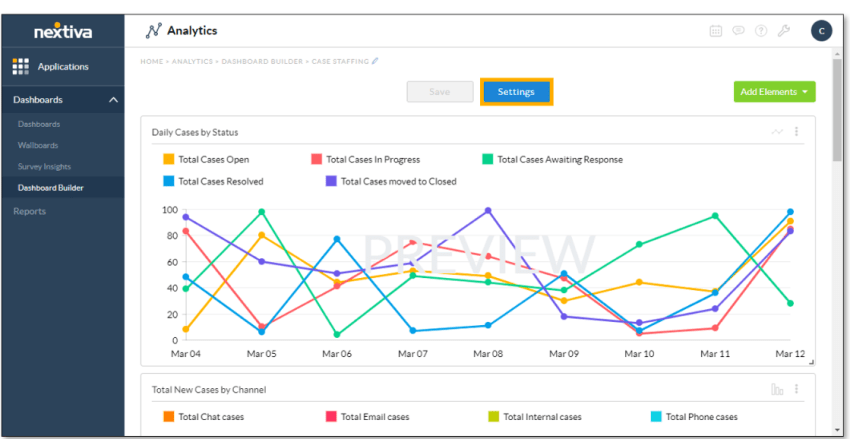
- Nextiva: Offers rich call center analytics tools with real‑time dashboards, detailed call reports, customer journey tracking, and AI‑powered insights like sentiment/emotion detection and auto‑transcription on supported plans. Other features include customizable wallboards, gamification tools, real-time conversational insights, and post-call surveys.
- Some KPIs and metrics Nextiva’s call center analytics track include:
- Average handle time (AHT)
- Call volume
- Customer satisfaction scores (CSAT)
- Average hold time
- Missed call rate
- First-call resolution (FCR)
- Grasshopper: Provides only basic call metrics (e.g., call counts and usage), with no advanced reporting, dashboards, or customer‑journey analytics.
- Grasshopper offers three analytics options:
- Usage reports with average call length for incoming and outgoing calls and call duration
- Activity reports that track voicemails, hang-ups, and faxes
- Detailed reports that contain timestamps, caller ID, connecting number, extension involved, and whether they were outbound or inbound calls.
Team collaboration (messaging, video calls)
For businesses that rely on seamless voice and video communication, Nextiva stands out as a comprehensive solution, while Grasshopper’s business phone service focuses solely on voice calling.
- Nextiva: Functions as a unified communications platform with HD voice and video calls, allowing users to switch between video and phone calls effortlessly. The video contact center enables video conferencing (often up to ~200 participants), team collaboration with dedicated chat rooms, group calls, instant messaging, and file sharing.
- Grasshopper: Focuses on phone and SMS, but not internal team chat or video conferencing capabilities, meaning businesses needing video communication must use third-party tools like Zoom or Microsoft Teams.

Customer engagement (SMS/live chat)
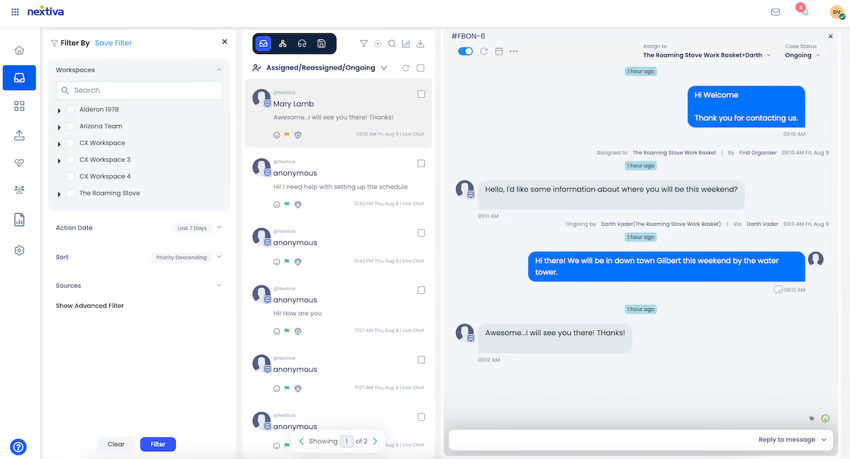
- Nextiva: Nextiva’s live chat platform includes website/live chat, business text messaging, internal team chat, AI-powered chatbots, canned responses, and advanced chat routing based on agent expertise. Provides omnichannel tools on higher plans, including centralized conversation history and features to personalize experiences across channels.
- Grasshopper: Offers business texting (SMS) from your business number and automated text replies for missed calls, but lacks live chat, team messaging, file sharing or chat routing. Since Grasshopper is a virtual phone system rather than a unified communications platform, it does not include omnichannel engagement features.
Integrations and CRM
- Nextiva: Connects with major CRM systems like Salesforce, Zoho, Microsoft Dynamics, and Oracle Sales Cloud. For entrepreneurs focused on marketing and sales, Nextiva integrates with HubSpot, Pipedrive, and Zendesk. This allows for alignment between outreach, customer support, and internal communication, enabling teams to sync interactions across multiple touchpoints of the customer journey. Nextiva’s support of Zapier is a huge plus for small teams, so they can link Nextiva to tools like Slack, Trello, QuickBooks, Calendly, Mailchimp, and more.
- Grasshopper: Offers only two business integrations, Google Voice and Skype, which is fine for businesses that need only basic phone functionality, but not for entrepreneurs who depend on a connected tech stack to stay efficient. It also cannot connect with CRM, automation, or support platforms, making a standalone virtual phone system.
Reliability and Uptime
When it comes to reliability, both Nextiva and Grasshopper claim very high uptime, but the differences in their infrastructure and service history set them apart.
- Nextiva: Advertises a 99.999% uptime SLA for its communications services and ensures near-perfect uptime through a network of eight carrier-grade data centers across North America. These data centers are designed with redundancy, meaning that even if one experiences an issue, another seamlessly takes over, preventing service interruptions. The company also provides 24/7 network monitoring to detect and resolve issues in real time and a live status page.
- Grasshopper: Also advertises very high uptime (around 99.999%) although there have been more reported outages. They have a public status page for monitoring incidents, but don’t prominently publish a specific uptime SLA on their main product pages. The company is generally seen as reliable for U.S. and Canada calling but with a less extensive global infrastructure.
For businesses that rely heavily on uninterrupted communication, Nextiva’s extensive redundancy and proactive monitoring offer an added layer of network security against potential disruptions, making it a reliable choice for businesses expanding globally.
Customer Support
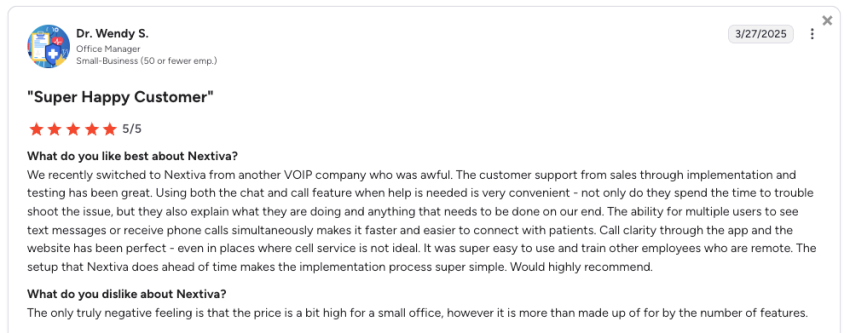
Reviewers on G2 rate Nextiva’s support far better than Grasshopper’s, with a score of 9.0 (from 2,750+ users), compared to 7.6 (from only 108 Grasshopper users).
Ease of Setup and Usability
- Nextiva: Known for its intuitive interface and a guided onboarding process, they provide self-service portals, phone support, and a dedicated onboarding team to guide users through the set-up process. This level of support makes it easier for businesses without technical expertise to configure complex features like call routing and voicemail workflows. Users can manage additional aspects of their business, such as social media and review management, all from a single interface.
- Grasshopper: Minimalistic and straightforward platform is designed to be simple for desktop and mobile devices, making it ideal for small businesses or those new to VoIP services. While it may not have the advanced features that Nextiva offers, the simplicity of Grasshopper’s VoIP makes it a good choice for users who need a basic, no-frills system.
Scalability
Nextiva’s scalability makes it ea to meet customer demands while enhancing internal workflows. Grasshopper is better suited for small businesses that do not anticipate significant changes in their communication needs.
- Nextiva: This centralized omnichannel solution grows seamlessly alongside your business, unifying phone, email, chat, and social media customer service through one AI-powered contact center. The platform optimizes agent workflows and provides comprehensive analytics, so that companies can efficiently handle increasing support volumes without adding headcount.
- Grasshopper: While good for small businesses, growing companies may face limitations with Grasshopper as their communication needs expand. Its platform is straightforward but is missing many key features and customization options that scaling businesses need.
For businesses anticipating growth, Nextiva enables consistent customer experiences across all channels while providing the data-driven insights needed to make informed decisions as support needs evolve.
Final Recommendation: Which Should You Choose?
Both Nextiva and Grasshopper offer excellent options for small businesses, but the best choice depends on your specific needs.
Small businesses
- Nextiva: If you’re looking for advanced features like team collaboration tools or multi-channel communication, Nextiva’s platform will provide more comprehensive solutions.
- Grasshopper: Their pricing plans are a good option for small businesses, solopreneurs, and startups on a budget and teams that just need basic phone services.
Mid-sized businesses
- Nextiva: For mid-market firms that require scalable solutions with team collaboration, strong security, and advanced customer support, Nextiva is the better fit. Its integrations, customizable plans, and tools for managing customer interactions can support your business’s evolving needs.
- Grasshopper: falls short while your communication requirements increase.
Enterprises
- Nextiva: Great option for larger businesses or enterprises with complex communication needs. Its comprehensive suite of collaboration tools, high-level security, and scalability make it an ideal choice for organizations requiring extensive features, integrations, and high reliability.
- Grasshopper: With its minimalist platform, this option simply won’t meet the demands of enterprise-level operations.
Why Growing Teams Choose Nextiva
If you want a simple phone system for a solo line or very small team, Grasshopper can cover the basics. But if you’re planning to grow, or you already need stronger routing, reporting, and collaboration, Nextiva is built to scale with you.
Nextiva brings voice, messaging, and customer engagement tools into one platform, with reliability and support designed for business-critical communications. As your needs expand, you can add users, channels, and features without switching systems or rebuilding your call flows.
If you’re ready to take your company to the next level with the right business communication tools, explore how Nextiva can help streamline your processes and improve your customer experience. Learn more about why businesses choose Nextiva and transform yours today.
Build Amazing Customer Experiences
Transform customer experience on a Unified Customer Experience Management platform designed to help you acquire, retain, and grow your customers.
Nextiva vs Grasshopper FAQs
Nextiva is typically the better fit if you want deeper call analytics and reporting for teams, including more robust visibility into performance and activity trends. Grasshopper offers call reporting, but it’s generally oriented toward simpler tracking for small teams.
Nextiva is a full business communications platform designed for growing teams, with broader features for routing, reporting, and collaboration. Grasshopper is a simpler virtual phone system that’s often a better match for solopreneurs or very small businesses that mainly need a business number and streamlined call handling for incoming calls.
Pros:
– Built to scale for teams and multi-location businesses
– Strong feature set (routing, reporting, collaboration options)
– Often supports unlimited calling on many plans (plan details vary)
Cons:
– Can cost more than lightweight virtual phone services
– More features means a slightly steeper setup curve for very small teams
Pros:
– Simple setup and easy day-to-day use
– Good fit for solo users and small teams that want basic call handling
– Helpful for keeping personal and business lines separate
Cons:
– Less advanced routing and analytics than team-focused platforms
– Fewer built-in collaboration options
– May not deliver the same superior call quality consistency you’d expect from more advanced business phone platforms, depending on your setup and requirements


